





1xBit promo code: BETHAPLast verified: October 2026
| Way onto my phone | Available | What I found |
|---|---|---|
| Google Play | No | No 1xBit listing; Play results that appear are for 1xBet, a different brand |
| App Store | No | No 1xBit betting app from Apple listings I checked |
| Official Android APK | Yes - primary native path | Installer offered on the 1xBit mobile page at 1xbit.com |
| Mobile website | Yes | 1xbit.com in Chrome or Safari with the full sportsbook and casino |
| Add to Home Screen | Yes | Android Chrome Install or Add to Home Screen, and iPhone Safari Share then Add |
My search for a 1xBit app did not end in Google Play or the App Store. What I found instead is an official Android APK on the 1xBit mobile page, plus a mobile site that works in the phone browser and that I can pin to the Home Screen on Android and iPhone. Store search results keep mixing in 1xBet, so I stay on 1xbit.com and ignore look-alike listings.
1xBit itself is built around crypto deposits and a combined sportsbook-casino shell. On a phone that means I care about three practical questions: where the installer actually comes from, how an iPhone opens the same account without a store icon, and whether the browser path is complete enough when I skip the APK. I based those answers on the official mobile page copy, the live bethap dump I backed up, and what I saw when I opened 1xbit.com on my phone browser.
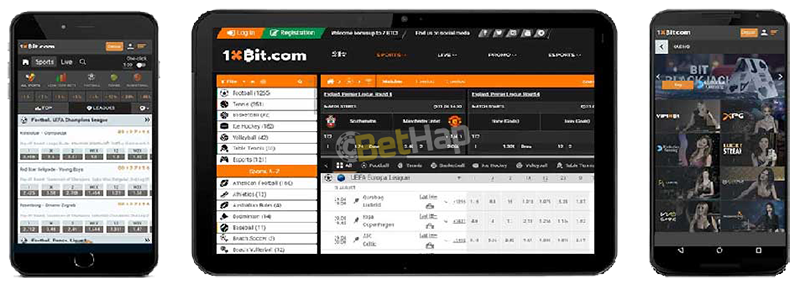
On paper many affiliate write-ups promise a Play download and an iPhone store app. On the ground I could not verify either for 1xBit. The operator page that matters is the mobile section on 1xbit.com, where Android gets an APK button and iPhone guidance points at Share and Add rather than Apple listings. Anyone who wants the wider bookmaker picture beyond the phone can read my full 1xBit review.
I also treat brand confusion as a safety issue. Typing 1xBit into Play surfaces 1xBet builds and tipster clones. Those are not the product I am reviewing here, and I never install them as a shortcut to 1xBit.
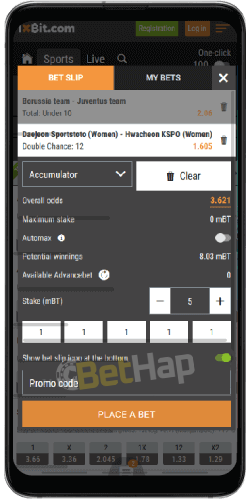
I only trust the Android file from the 1xBit mobile page. Mirror APK sites, soft-portal mirrors, and files labelled as 1xBet are not the path I use, even when search ads push them hard.
| Android APK detail | How it went for me |
|---|---|
| Download source | 1xBit mobile page only |
| Store involved | None - Play stays unused |
| Permission | Install unknown apps, granted once then removed |
| Files I skip | Third-party APK portals and any 1xBet installer |
Once installed, the icon opens the 1xBit shell. Updates are not handled by Play, so when something feels stale I return to the same official mobile page for a fresh file instead of hunting random version archives.
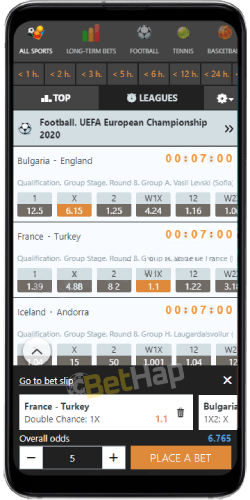
There is no App Store listing for 1xBit that I could verify. Older guides still talk about TestFlight invites and QR sideloads; I leave those alone. On iPhone I stay in Safari and pin the site, which matches the Share and Add flow described on the official mobile page.
| iPhone detail | How it went for me |
|---|---|
| Browser used | Safari - other iPhone browsers may hide Add to Home Screen |
| Store listing | None for 1xBit betting |
| Result | Full-screen shortcut to the same account I use on desktop |
| Paths I skip | TestFlight links from old guides, and QR installs from unknown pages |
When I do not want an install at all, the mobile site is enough. Chrome on Android and Safari on iPhone both open sports, live markets, casino lobbies, and the cashier without an APK. The layout matches the desktop site closely enough that I can move between pre-match slips and live coupons without hunting for menus.
| Mobile browser detail | My reading |
|---|---|
| Address I type | 1xbit.com, entered by hand |
| Works without download | Yes - sportsbook, casino, and account |
| Same login as APK | Yes - one balance and one bet history |
| Optional extra step | Add to Home Screen when I want a shortcut |
On a weak connection I still prefer the browser path first, because I can refresh a single tab without waiting on an APK reinstall. Once the connection is stable I switch back to the installed icon on Android if I already saved the official file.
| Task on my phone | Official APK | Mobile browser and Home Screen |
|---|---|---|
| Sign-in | Yes | Yes - same credentials |
| Sports and live bets | Yes | Yes |
| Casino lobbies | Yes | Yes |
| Crypto cashier | Yes | Yes |
| Store updates | No - manual APK refresh from 1xbit.com | Not needed - the site updates itself |
For day-to-day use I do not see a feature gap that forces the APK. I keep the APK when I want a dedicated Android icon and fewer browser chrome distractions. I keep the browser path when I am on a borrowed phone or an iPhone. Lobby screenshots and table rules sit on my 1xBit casino write-up when I want that depth.
New sign-up works inside the APK and inside the mobile site. I open registration, fill the usual fields, and place BETHAP in the promo line before I confirm. Email or wallet details follow whatever the form asks that day. After the account exists I can leave the phone and finish verification later on desktop if 1xBit requests it, then return to the same login on mobile.
| Registration step | What I do on the phone |
|---|---|
| Where I start | Sign-up inside the APK or on 1xbit.com in the browser |
| Promo field | BETHAP entered before I submit |
| After submit | Same username works on APK, browser, and Home Screen icon |
| Already registered | Sign in with the same login - no second signup for the code |
Offer wording changes often enough that I read the current 1xBit bonus notes when I care about promotions, and on mobile I stay focused on how I open the account.
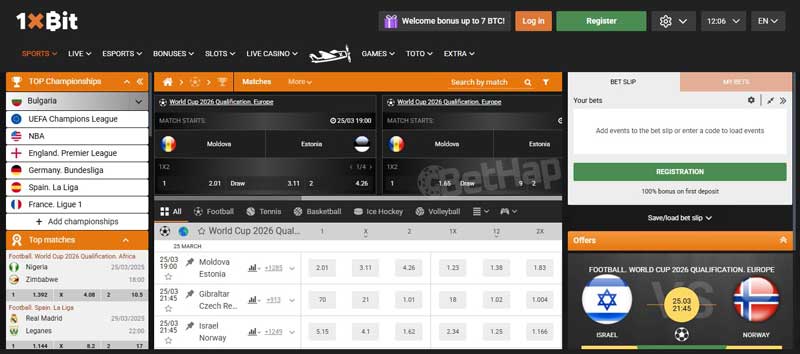
On the APK and on the mobile site I reach the same sportsbook: pre-match lines, live betting, and cash-out where 1xBit offers it. Football, tennis, basketball, cricket, and esports all sit in the usual sport list. Odds tickets build the same way as on desktop, and bet history stays attached to the account rather than to the device.
Slots, table games, and live dealer tables open inside the same mobile shell as the sportsbook. I switch sections from the main menu without leaving the app or the browser tab. Provider lists and lobby size claims vary across third-party write-ups, so I leave counts out and stick to what the phone UI actually shows when I open it.
Bonus calendars and wagering detail live on the offer pages, so I leave offer figures out of the install steps.
During registration on the phone I enter BETHAP in the promo field. It does not unlock a separate app-only pack on its own; the same welcome and ongoing offers appear in the APK and in the mobile site under the same terms. For the full code map I keep the 1xBit promo code page.
I never import rival codes from APK blogs or from 1xBet landing pages. On this brand the only code I type is BETHAP.
The cashier I open on mobile lists cryptocurrencies for deposits and withdrawals. The names I confirmed on the live payments section follow in the table. I skip inventing fiat rails that the cashier never lists, and I skip repeating coin counts that change from article to article.
| Payment method | Deposit | Withdrawal | Note |
|---|---|---|---|
| Bitcoin | Yes | Yes | Named on the live mobile payments section |
| Ethereum | Yes | Yes | Named on the live mobile payments section |
| Litecoin | Yes | Yes | Named on the live mobile payments section |
| Dash | Yes | Yes | Named on the live mobile payments section |
I only install the APK from 1xbit.com, then I turn unknown-sources access back off. I do not chase Play or App Store icons that belong to 1xBet or to tipster clones. Account recovery and support run through the same help routes I see on desktop once I am signed in. Licence wording conflicts across third-party sites, so I skip licence claims here.
When a download prompt appears inside a random browser pop-up rather than from the 1xBit mobile section I close it. The same rule applies to Telegram files and emailed APKs that claim to be a faster 1xBit build.
The honest phone path for 1xBit is the official Android APK plus the mobile site, with a Home Screen shortcut on iPhone instead of an App Store download. I keep BETHAP in the registration field, stay away from mirror APKs, and treat store search hits for 1xBet as a different product. That is the setup I use when I open 1xBit on a phone.