





22Bit app is available for both Android and iOS devices. If you want to know more, then you are on the right place. Keep reading and you will see all the details on the download process and specifics.
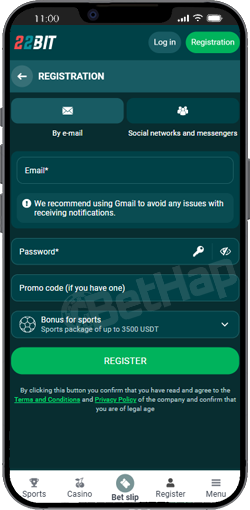
Many players search for the 22Bit app for iOS devices, especially those using an iPhone or iPad Air. However, like many crypto casinos, the platform does not always provide a traditional download through the Apple App Store.
Instead, the casino offers an app-style experience through the mobile site, which can be added to your home screen and used similarly to a mobile app. This allows the platform to function properly on compatible iOS devices without requiring an official App Store listing.
Once added to the home screen, the site behaves almost like a native app. The layout adapts automatically to the screen size, the sections load quickly, and users can access their casino games, sportsbook, and account settings with one tap.
This approach is common among crypto gambling platforms because Apple has strict rules regarding crypto gaming and gambling apps in the App Store.
Even though the 22Bit app is not always listed in the App Store, installing the mobile version on an iPhone is still very easy.
Follow these steps:
Open the Safari browser on your iPhone or iPad.
Visit the official 22Bit website.
Log into your account or create a new account.
Tap the Share icon (Apple icon) in the browser menu.
Select “Add to Home Screen.”
Confirm the shortcut.
After this, the 22Bit mobile app icon will appear on your home screen. From that moment you will have one tap access to the casino and sportsbook, similar to a traditional mobile application
Android users usually have a slightly different installation process. Many crypto casinos provide a direct APK file instead of distributing their apps through the Google Play Store.
The 22Bit app for Android is designed to give players and crypto users instant access to:
the sportsbook
the casino section
live betting
the cashier and payment methods
During testing we noticed that the Android version loads quickly and provides a smooth experience when placing bets or playing casino games.
The interface is similar to the desktop version but optimized for smaller screens. Buttons are larger, navigation menus are simplified, and the betting slip is easy to use when placing single bets or accumulator bets.
This makes the app a good option for players who want to begin betting or play casino games directly from their smartphone.
Installing the 22Bit app for Android devices usually involves downloading an APK file. Here is the typical installation process:
Visit the official 22Bit website using your Android smartphone.
Open the app section and choose the Android version.
Tap Download the App.
The system will download the APK file.
If a pop up window appears asking about unknown apps, allow installation from unknown sources.
Complete the installation process and open the app.
Once installed, the Android icon will appear on your device, giving you direct access to the platform.
This process takes only a few minutes and allows users to start playing casino games or placing bets almost immediately.
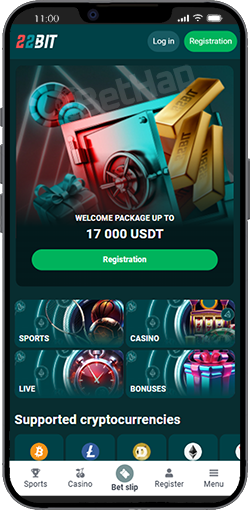
The good news is that the 22Bit mobile application has very few system requirements. Most modern smartphones can run the app without any problems.
Typical requirements include:
Android 7.0 or higher for Android devices
Current versions of iOS for Apple devices
Stable internet connection
A small amount of free space for the installation
Updated browser or operating system
If the device meets these requirements, the app should function properly and provide a smooth gaming experience.
Most modern smartphones, including newer iPhone models and popular Android devices, can run the platform without any issues.
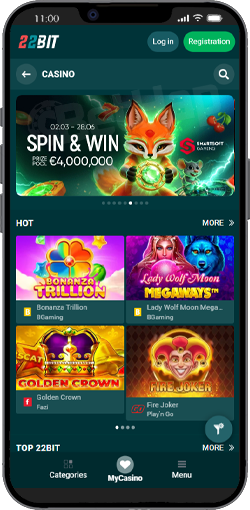
Players who prefer not to install an app can still use the 22Bit mobile website, which is optimized for smartphones and tablets.
In fact, during our testing the mobile website performed almost exactly like the mobile application. The design automatically adjusts to the screen size, and the navigation menu allows quick access to the main sections:
casino with slots, table games, all other games
sportsbook
promotions
account settings
deposit and withdrawal pages
One advantage of the mobile website is that players do not need to install anything. They simply open the website in their browser and start playing.
For some users this is actually the easiest solution because it avoids downloading APK files or unknown apps.
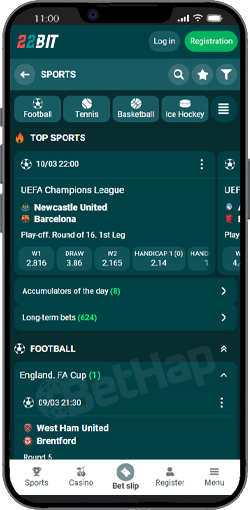
One of the biggest advantages of the 22Bit mobile platform is that it provides full access to both sports betting and casino games. Players can easily switch between the sportsbook and the casino without leaving the app. The sports betting section includes:
football leagues and international tournaments
basketball competitions
tennis matches
esports tournaments
niche sports markets
Users can place pre match bets, live betting wagers and accumulator bets. Live betting is especially convenient on mobile devices because players can place bets quickly while watching matches unfold.
The casino section is just as strong. Players can enjoy a large selection of games, including Gates of Olympus, Sweet Bonanza, Big Bass Bonanza and Starlight Princess. There are crash games too, table games and of course, live games available for all players, not only slots.
The platform also supports casino bonuses and sports bonuses, which can be activated directly from the mobile interface after the first deposit. You can also use our 22bit promo code - BETHAP during the registration as new players to get the best promotions.
Overall, the mobile experience feels very similar to the desktop version. All major features are available, and the sections adapt well to smaller screens. For casino players and sports fans who want crypto convenience and instant access, the 22Bit app and mobile website provide a reliable way to play games and place bets anywhere.
When using 22Bit on a mobile device, players usually have two options: installing the 22Bit app (APK for Android or home-screen shortcut for iOS) or simply using the 22Bit mobile website through a browser. Both options allow users to access games, sports betting markets, and account features, but the experience can feel slightly different.
During our testing, both versions worked smoothly. The mobile website is very well optimized, which means you can begin betting or playing casino games without downloading anything. On the other hand, the mobile application provides quicker access and a slightly more app-like interface, which some players prefer.
Below is a quick comparison:
| Feature | 22Bit App | 22Bit Mobile Website |
|---|---|---|
| Installation | Requires APK download (Android) or home-screen shortcut (iOS) | No installation required |
| Access Speed | One-tap access from phone home screen | Open through browser |
| Updates | Requires installing the latest version | Updates automatically |
| Casino Games | Full access to slots, crash games, live tables | Same games available |
| Sports Betting | Supports pre-match and live betting | Full sportsbook access |
| Device Compatibility | Android devices and iOS shortcuts | Works on any smartphone browser |
For most casino players and sports bettors, the difference is mostly about convenience. If you prefer instant access and faster navigation, the 22Bit app may be the better choice. However, if you don’t want to install files from unknown sources or prefer a simpler setup, the site is perfectly capable and offers the same core features.
Overall, both versions provide a smooth experience for crypto gaming, allowing users to place bets, play slots, and access promotions directly from their smartphones.
The 22Bit app and mobile website both deliver a strong mobile gambling experience, giving players full access to the casino and sportsbook from their smartphones. Whether you prefer downloading the app or using the browser version, the platform runs smoothly and provides quick access to slots, live games, and sports betting markets.
For many players, the app offers faster navigation and one-tap access, while the mobile site remains a convenient option that works instantly without installation. In the end, the best choice depends on personal preference and how often you plan to use the platform.