





Last verified: September 2026
| Route on my phone | Coldbet status | What I actually did |
|---|---|---|
| Android APK from the Coldbet website | Yes - native build | Tapped Download Android App on the official site, cleared the unknown apps prompt once, then opened Coldbet.apk |
| Google Play betting build | No | A fixtures app borrows the name on Play; the betting build I used came from the brand site |
| Apple App Store | No | Nothing to download for iPhone or iPad; the Safari shortcut covers Apple devices instead |
| Safari Home Screen icon on iPhone and iPad | Yes | Safari, Share, Add to Home Screen - a shortcut that reopens the mobile site without the address bar |
| Mobile browser, nothing installed | Yes | Sportsbook, casino, sign-up, payments and settings all opened in Chrome and Safari |
I split this Coldbet test across two ecosystems on purpose, because the brand treats them differently. My Android phone got a proper native app from an APK file, while on my iPhone and iPad I pinned the Coldbet mobile site to the Home Screen from Safari. Both reached the same sportsbook and casino, yet the setup, the storage cost and the update habits are not the same. Below I walk through each route, what I liked, where it fell short, and which one I would keep on my own device.
For anyone who has never heard of the brand, Coldbet is a sportsbook and casino in one account, and my full brand overview sits on the Coldbet review. This page stays with the phone side only.
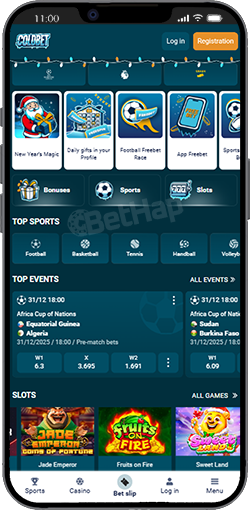
Short version: a native app on Android, a Safari shortcut on Apple. Here is how that broke down when I checked each platform:
Search results for this brand are crowded with third-party APK download sites and even some modded builds. I skip all of them. The only file I trust for this review is the one the Coldbet website hands out.
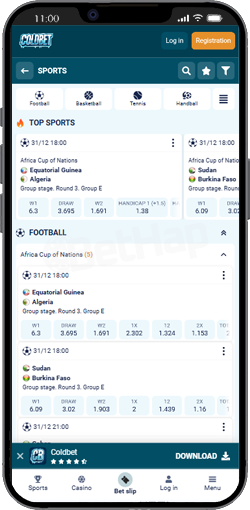
The Android client gave me the most complete Coldbet experience of the three routes. I put it on more than one Android handset and it behaved the same on each: light, quick to open and steady while I jumped between live markets and slots. This is exactly how the install went for me:
| Stage | On my Android handset |
|---|---|
| Where the file lives | Behind the Download Android App control on the Coldbet site |
| File I opened | Coldbet.apk from my downloads folder |
| Permission I granted | Install unknown apps, for my browser only, during this one setup |
| First launch | Open, then my usual login - no second setup needed |
| Mirror or modded copies | Ignored every time, however high they rank |
Sideloading is only as safe as its source. After Coldbet was installed I switched the unknown apps permission back off for my browser, so nothing else could slip in the same way. I also never install a Coldbet build that arrives through a chat link or a download portal, since I cannot tell who packaged it or whether it was altered.
Apple users will not find Coldbet in the App Store. What they get is a Safari shortcut to the mobile site, and once that icon sits on the Home Screen it feels much closer to an app than a browser tab does. I ran it on an iPhone and an iPad and it was smooth on both. The address bar vanished, the lobby opened full screen, and live betting sessions stayed stable while I hopped between sections.
These are the taps that got the icon onto my iPhone:
| Moment | What I saw on iOS |
|---|---|
| Browser to start in | Safari on both iPhone and iPad |
| Menu path | Share icon, Add to Home Screen, then Add |
| How it opens | Full screen from the new icon, no address bar in the way |
| Updates and storage | Refreshes through the website and takes up very little space |
| Weak spot | Push notifications are more limited than on Android |
A useful side effect: I never had to download new versions by hand on iOS. Each time I opened the icon it pulled the current site, which also kept my storage almost untouched.
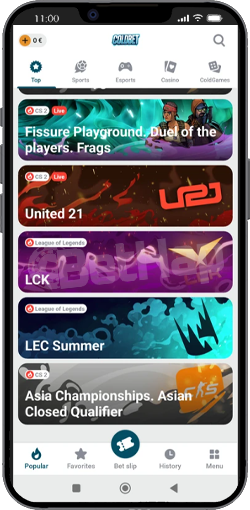
Some days I just opened Coldbet in Chrome or Safari and skipped any icon. The layout shrank to my screen without cramming anything: menus were clear, odds were easy to read and long sports lists scrolled cleanly. Pages loaded quickly, live odds kept pace during football and tennis matches, and a bet took only a few taps.
Registration, deposits, withdrawals and account settings all worked in the browser too, so I could not spot any missing piece compared with desktop. For a borrowed phone or a device with little free space, the plain mobile site is a fair choice.
During busy in-play windows the app stayed responsive. Odds updated almost instantly, bets on football and live tennis were accepted without lag, and I had no freezes while switching between running events. The Android build also picked up right where I left off after short signal drops, with no fresh login needed.
Coldbet goes for function over flashy effects. Sports sit in tidy categories, the bet slip is simple to edit, and the casino menu filters by provider or game type. The controls were where my thumb expected them, so I rarely dug through menus.
Whether I used the Android app or the Safari icon on my iPhone, Coldbet opened straight from its icon. No typing an address, no hunting for an old tab. That saved real seconds when a live price was moving.
Deposits and withdrawals felt just as simple on my phone as on a laptop. Verification, account settings and bonus tracking were all reachable inside the app, and I handled everything without picking up another device.
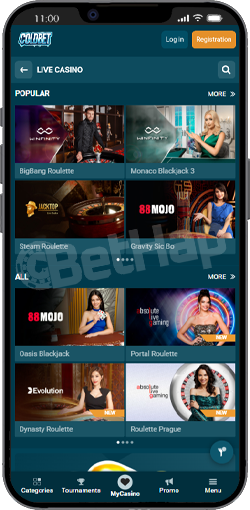
I tried football, tennis and basketball markets on the phone, and each slip was confirmed almost at once, even when I changed picks mid-match. On a small screen the sports list, the market area and the bet slip folded neatly into place instead of fighting for room. What I found on mobile:
On the casino side, slots opened full screen and kept autoplay, turbo spins and info panels, while live dealer streams held clear sound and picture. Demo mode on many slots let me feel out volatility before real money. These are the titles I loaded to stress the phone:
| Title I loaded | Studio | Game type | How it ran on my phone |
|---|---|---|---|
| Sweet Bonanza | Pragmatic Play | Slot | Top marks - no lag at all |
| Gates of Olympus | Pragmatic Play | Slot | Top marks, fluid from the first spin |
| Big Bass Bonanza | Pragmatic Play | Slot | Very good, only a notch behind |
| Book of Sun | Booongo | Slot | Very good and dependable |
| Lightning Roulette | Evolution | Live Casino | Top marks, clear live video |
| Crazy Time | Evolution | Live Game Show | Top marks, the stream never dropped |
If you want the lobby in depth, with providers and game types beyond this phone check, I cover it on the Coldbet casino page.
All three routes lead to the same features, so the choice comes down to habits. For daily live betting I reached for the Android app or the iOS icon, because both got me in faster. The browser suited quick visits when I did not want anything installed.
| What I compared | Android APK | Safari icon on iPhone | Mobile browser |
|---|---|---|---|
| Getting started | Download Coldbet.apk from the site and install it | Pin from Safari in five taps | Open the site and log in |
| Space on the device | Needs room for a real app | Barely any | None |
| Feel and speed | Snappiest transitions of the three | Close to native once full screen | Very good, just a touch behind |
| Keeping current | Updates handled for me | Follows the live website | Always the latest page |
| Notifications on the phone | Fullest notification support | Push is more restricted | Not something I used |
| What worked for me | What held it back |
|---|---|
| A real Android app straight from the Coldbet site | iPhone and iPad owners get a Safari shortcut, not an App Store download |
| In-play markets refreshed fast and slips cleared quickly | Notifications on iOS are thinner than on Android |
| Live dealer streams and slots ran smoothly on a small screen | The design is practical rather than modern |
| The iPhone icon barely touches storage and always loads the current site | The APK route means allowing unknown apps for a moment |
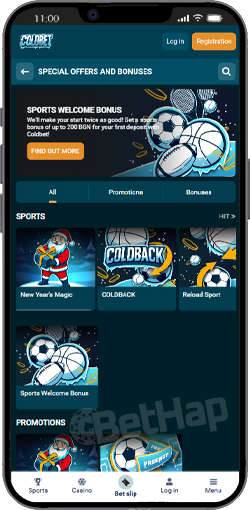
Account creation works inside the Android app, the Safari icon and the browser alike. The promo code shown on this page is BETHAP, and I keep it handy for the registration form. It is not tied to an app-only reward here, so for the current welcome offers and their terms I point readers to the Coldbet promo code page.
After this September 2026 round, my verdict is simple. On Android I would install the Android APK offered on the Coldbet site, because it was the quickest and steadiest way to bet live and play the casino. On iPhone and iPad a Safari Home Screen icon is the honest equivalent, as there is no App Store version, and it still opens full screen from the Home Screen. The mobile website covers everything else when I would rather not install a thing.
I hit no crashes or broken pages in normal use. The look is plain, but that plainness keeps menus clear and pages fast, which matters more to me on a phone than visual polish.