GGBet promo code: BETHAPLast verified: November 2026
| Route | Status | Evidence |
|---|---|---|
| APK for Android phones | Yes | Android tab on the official app page |
| Android store listing | Listed in search results | Google Play listing seen in search, not on the official app page |
| iPhone and iPad | Yes | iOS tab and QR code on the official app page |
| Mobile website | Yes | Phone view with LOGIN and SIGN UP in the header |
| Home Screen shortcut | Yes | Chrome or Safari browser menu |
The GGBet app comes as an Android APK from the official app page, with an iOS tab and a QR code on the same page for iPhone and iPad owners, and the mobile site covers every other phone. At an earlier check, I saw GGBet phone screens for the casino lobby and the sportsbook, both with LOGIN and SIGN UP at the top.
The official app page splits the download into an Android tab and an iOS tab, invites visitors to download the Android GG.BET app and shows a QR code to scan with a phone. On the main site, a Get App entry sits in the menu, a Download app link sits in the footer, and an app install section appears on the home screen.
Inside, the same account opens Bets, Live, Casino, Live Casino, Promotions, Leagues, Tournaments, Quests, Bonus Shop and Wheel of Fortune, so the app and the mobile site cover sports, esports and casino under one login.
Android phones and tablets take the APK from the Android tab of the official app page. iPhone and iPad owners follow the iOS tab or scan the QR code shown there, which opens the install route on the phone itself. Any other phone, or a device without room for one more app, can load the phone site in Chrome or Safari and pin it to the Home Screen.
| Device | Route | Source |
|---|---|---|
| Android phone or tablet | APK from the Android tab | Official app page |
| iPhone or iPad | iOS tab or QR code | Official app page |
| Any phone browser | Mobile site and Home Screen shortcut | Chrome or Safari |
The Android route starts on the GGBet site in Chrome. The official app page carries the Android tab and the download link, and the Get App menu entry and the Download app footer link both lead there.
| Step | Where | Result |
|---|---|---|
| Get App or Download app | Site menu or footer | Official app page opens |
| Android tab | Official app page | APK download starts |
| Install prompt | Android system dialog | App icon lands in the drawer |
A Google Play listing for GGBet also appears in search results under the publisher name Rednines Gaming, the company name an earlier GGBet app review tied to the brand. The official app page, not that listing, is the source for these steps.
For Apple devices, the official app page offers an iOS tab next to the Android one, plus a QR code meant for a phone camera. Scanning that code with the iPhone moves the download from a desktop screen to the phone without typing an address. The iOS tab and the code sit on the same page as the Android tab, so one visit covers every device in a household, and the account created on one phone logs in on the other.
| Step | Where | Result |
|---|---|---|
| iOS tab | Official app page | iPhone route shown |
| QR code | Desktop screen to iPhone camera | Install route opens on the phone |
| First launch | iPhone or iPad | LOGIN and SIGN UP in the header |
The mobile site needs no file at all. At an earlier check, I saw the phone version with the GGBET logo at the top left and LOGIN and an orange SIGN UP button at the top right, the same header on the casino lobby and on the sportsbook. A Home Screen shortcut turns that site into an icon that opens like an app.
| Browser | Menu path | Result |
|---|---|---|
| Chrome, Android | Menu behind the three dots, then Add to Home screen | GGBet icon next to other apps |
| Safari, iPhone | Share icon, then Add to Home Screen | GGBet icon next to other apps |
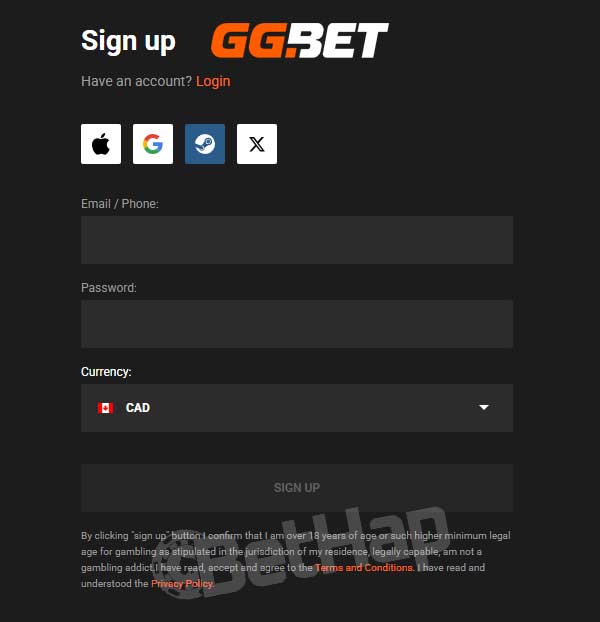
The GGBet site describes sign-up as a short sequence: Sign Up in the upper right corner, then an email or phone number and a password, with Apple, Google, Facebook, Steam and X as one tap alternatives, and finally the terms and conditions. The same steps run both in the app and in the phone browser.
For the GGBet app login, the LOGIN button sits beside SIGN UP in the phone header, so a returning player reaches the account from the lobby or the sportsbook without any extra menu.
At an earlier check, I saw Bonus Chest and Promo And Bonuses buttons in a row under the phone header of the sportsbook, next to a search icon and a star for favourites. The main menu adds Promotions, Bonuses, Quests, Bonus Shop, Wheel of Fortune and Tournaments, so offers stay a tap away on a phone.
BETHAP is the GGBet promo code for the app as well as the site. The GGBet promo code page places it in the sign-up promo code field, while an earlier GGBet app review pointed to the Promotions section as the place to enter it. That earlier review also said no separate mobile bonus exists, so the app carries the regular offers.
Figures and terms for every welcome offer sit on the GGBet promo code page.
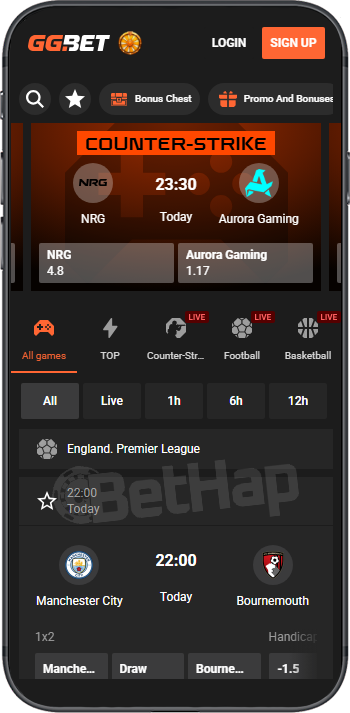
At an earlier check, I saw the phone sportsbook lead with a featured Counter-Strike match card showing two teams, a start time and two prices. Under that card, a tab row held All games, TOP, Counter-Strike, Football and Basketball, with LIVE tags on the last three, and a filter row offered All, Live, 1h, 6h and 12h ahead of a league panel with 1x2 and Handicap columns.
The operator lists esports such as Dota 2, Counter-Strike, League of Legends, Valorant, StarCraft 2, Rocket League, Mobile Legends and Rainbow Six, plus sports from football, basketball and tennis to hockey, cricket, darts and chess. Live betting has its own Live entry in the menu and its own filter in the phone view.
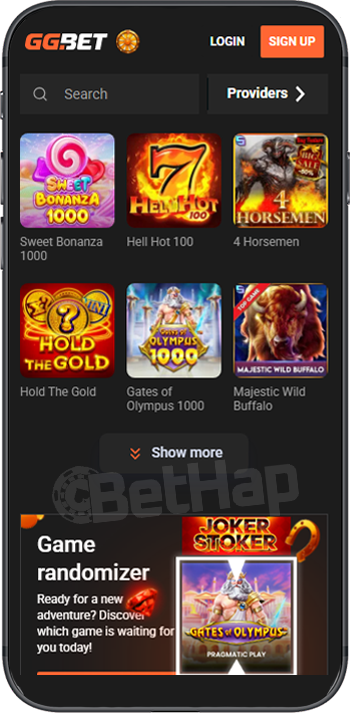
The GGBet casino lobby on a phone showed a Search box and a Providers button at an earlier check, then a grid with Sweet Bonanza 1000, Hell Hot 100, 4 Horsemen, Hold The Gold, Gates of Olympus 1000 and Majestic Wild Buffalo, the last one with a TOP GAME badge. A Show more button closed the grid.
Under it sat a Game randomizer banner that suggests a title with the line Ready for a new adventure, next to covers of Joker Stoker and Gates of Olympus. Live dealer rooms open through the separate Live Casino entry in the menu, next to Casino.
The operator says the site accepts and pays out through credit and debit cards, e-wallets and crypto coins, without naming single methods. The cashier sits behind the same account in the app as well as in the phone browser, so deposits and withdrawals follow the same rules on both.
| Direction | Methods |
|---|---|
| Deposits | Cards, e-wallets, crypto |
| Withdrawals | Cards, e-wallets, crypto |
The footer links a Payment Policy and a Bonus Policy, which hold the rules for both directions.
The operator lists three support routes: an email address, a phone line and live chat, and points players to its FAQ section before they open a ticket. The support email also appears in the footer under Support. The same routes work from the app and the mobile site, since both use the same account.
Live chat suits any issue, email suits bug reports and the phone line suits small issues that need no screenshots, as the operator itself describes. When the support team needs more information, it replies by email.
The installed app and the mobile site share the account, the menu and the cashier. The difference lies in the route: the app needs the APK on Android or the iOS route from the official app page, while the browser version needs nothing but an address and, if wanted, a Home Screen shortcut.
| Point | Installed app | Mobile site |
|---|---|---|
| Source | Official app page, Android or iOS tab | Chrome or Safari |
| Login | LOGIN button in the header | LOGIN button in the header |
| Home Screen icon | Added by the install | Added through the browser menu |
| Offers | Regular promotions | Regular promotions |
An earlier GGBet app review said the app and the mobile site carry the same promotions, which leaves storage and habit as the deciding points.
The GGBet app covers Android through an APK from the official app page and iPhone and iPad through the iOS tab and its QR code, while the browser version plus a Home Screen icon serves any other phone. Esports sit up front in the phone sportsbook, the casino lobby has search, a Providers filter and a game randomizer, and the cashier handles cards, e-wallets and crypto in both directions. The open point is the Google Play listing, which sits outside the official app page route.