Last verified: October 2026
| Route on a phone | Status at Sportuna |
|---|---|
| Apple store listing from the brand | Not offered |
| Google Play listing from the brand | Not offered |
| Downloadable Android file | Not verified - avoid |
| Phone browser site | Main route |
| Home Screen icon | Chrome on Android, Safari on iOS |
Searching for a Sportuna download leads to store pages, portals and copycat files, so I went through the stores myself before writing a word. The result is clear: the brand works through a handset browser, and a launcher shortcut gives it an app-like feel. Fresh registrations accept the code BETHAP on step one, and the Sportuna promo code review explains the offer terms.
I checked Google Play for the package names a brand app would normally use, such as com.sportuna and com.sportuna.app, and every one of them returned an error page. A search through the Apple catalogue for the brand name came back empty as well. The only Play result carrying the name belongs to OLD WORLD CRAFT Solutions, is filed under Business and describes consultancy work, so it has no link to the operator.
That leaves one honest answer for phone owners. Sportuna runs as a responsive website with the regular header, menu and lobby. Anyone hoping for a store badge will not find one, and at an earlier check the mobile and desktop versions offered the same features.
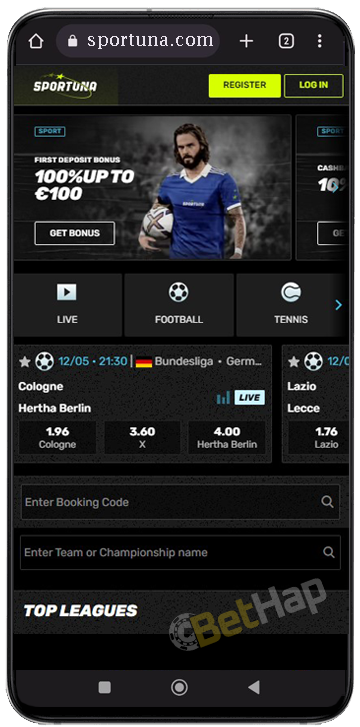
On Android, the brand address opens in Chrome like any other site, and no download is part of the process. At an earlier check, the phone layout showed Register and Log In buttons in the header, a promo slider underneath and a row of section tabs, followed by a booking code field, a team search field and a Top Leagues heading. At that same check, the Register button appeared on the front page of the mobile site, so a new account could be opened straight from Chrome.
Apple devices take the same route through Safari, again without any store download. At an earlier check, the mobile version matched the desktop site feature for feature, with casino games, live casino tables, sports betting, promotions and the cashier all available in the browser. The one layout difference noted back then was the position of the menu, which moved to the bottom of the screen instead of the top. On an iPad, the same browser route applies, since no Apple catalogue listing exists for either device.
Both routes are short and rely only on standard browser menus. On Android, the Chrome menu with three dots, then Add to Home screen and a name for the icon. On iPhone, the share symbol with the arrow leaving a box opens a list where Add to Home Screen appears; a label is typed and confirmed.
| Phone | Browser | Menu entry | Outcome |
|---|---|---|---|
| Android | Chrome | Menu - Add to Home screen | Launcher icon for the site |
| iPhone or iPad | Safari | Share sheet entry | Launcher icon for the site |
The icon opens the live site directly, so it takes almost no storage.
Download portals list files labelled with the Sportuna name, and some even show version numbers. None of those files came from a verified operator source in my checks: the likely Play package names all returned errors, the Apple catalogue had no brand title, and the Play entry with the same name turned out to be a consultancy app.
Installing an unverified package means switching on unknown sources in Android settings and trusting a publisher that cannot be traced to Sportuna. Since the browser site and its Home Screen icon already deliver the full account, my stance stays firm: no APK, only the official address.
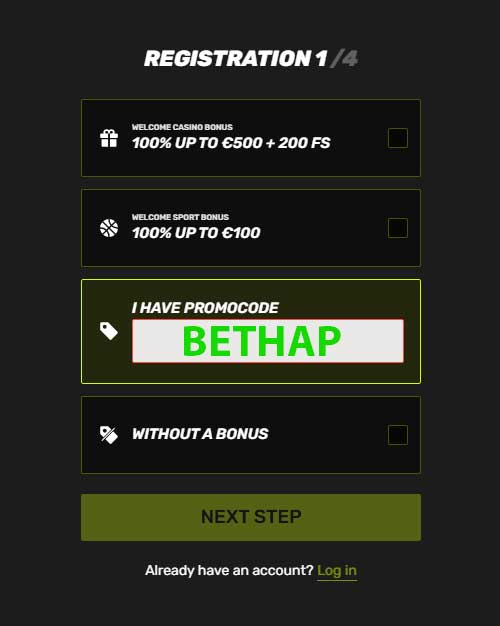
At an earlier check, registration ran across four screens. The first one offered a choice between a casino welcome offer, a sports welcome offer, a field marked I have promocode and a no-bonus option, with a Next Step button below and a Log in link for existing members. The code BETHAP goes into that field before any personal data is requested.
The remaining screens at that check requested login data (email, username, password), then personal details such as names, and finally an address before the account was created. The Register button that starts the process appeared on the front page of the mobile site.
At an earlier check, the Log In button appeared next to Register in the header of the phone layout, and the registration form linked back to it with an Already have an account line. One account covers both the phone and the desktop site, since the mobile version is the same platform in a smaller frame.
Verification documents are handled by the operator through the account, and the exact requirements are not something I could confirm on a phone this time, so I leave the details to the support team listed further down.
At an earlier check, the mobile browser carried the full casino side of Sportuna: slots, table games, live casino tables and other casino titles, all inside the same tab as the account and cashier. The promotions screen from that check featured a roulette tournament and a trivia game with a live host, which confirms that live tables are part of the phone offer. A fuller picture of the studios and categories is in the Sportuna casino write-up.
Because nothing is installed, Sportuna needs no space beyond the browser cache, and the Home Screen icon is only a link. My store checks found no Sportuna package for Android or iOS, so there is nothing to update through a store. When the site changes, the next visit loads the new version, since there is no stored build on the handset. That makes the browser route suitable for phones with little free storage, as long as the browser itself is current.
| Payment Method | Note |
|---|---|
| Interac | Shown in the cashier grid at an earlier check |
| Visa | Shown in the cashier grid at an earlier check |
| Mastercard | Shown in the cashier grid at an earlier check |
| Neosurf | Shown in the cashier grid at an earlier check |
| UTORG pscd | UTORG option, label as on the tile at an earlier check |
| UTORG Skrl | UTORG option, label as on the tile at an earlier check |
| UTORG NTLR | UTORG option, label as on the tile at an earlier check |
| eVoucher | Shown in the cashier grid at an earlier check |
| Jetonbank | Shown in the cashier grid at an earlier check |
| MiFinity | Shown in the cashier grid at an earlier check |
| Bitcoin | Shown in the cashier grid at an earlier check |
| Litecoin | Shown in the cashier grid at an earlier check |
At an earlier check, the cashier grid listed Interac, Visa, Mastercard, Neosurf, several UTORG options, eVoucher, Jetonbank, MiFinity, Bitcoin and Litecoin, and each tile carried its own limit per transaction. The page at that time also described the payment options as a mix of e-wallets, bank transfers, cards and cryptocurrencies, which matches the grid. Deposits and withdrawals run from the same cashier on the phone as on desktop.

At an earlier check, the site listed support at sportuna.com as the contact address, and an email can be sent from any phone mail app.
At that same check, the promotions tab in the mobile browser showed a welcome offer, a roulette tournament, a trivia game with a live host and a weekend reload, each card with a Get Bonus or Opt In button and a Details link for terms. I found no offer reserved only for phone users. Current terms are tracked on the Sportuna bonuses page.
| Pros | Cons |
|---|---|
| No download or install needed | No app in Google Play or the Apple catalogue |
| Same account on phone and desktop | A same-name Play entry can mislead newcomers |
| Home Screen icon for quick access | Unofficial APK files circulate under the brand name |
On balance, the browser approach handles registration with the code field on step one, the casino and live tables, the promotions tab and the cashier grid. The missing store app is the main drawback, and the confusing Play listing adds to it. For most phone owners, the shortcut icon closes much of that gap.
Sportuna has no app in either major store, and the honest route runs through Chrome or Safari, ideally with a saved launcher icon added from the browser menu. That setup handles sign-up, login, the cashier and the game lobby without any download. Third-party APK files and the same-name consultancy listing on Google Play deserve a wide berth. Brand background and overall ratings appear in the full Sportuna review, while BETHAP belongs in the code field on the first registration screen.